
12BET APK: Download and Install the Android App
This page gives you the official 12BET APK, the file details to check before you install, and the exact Android settings involved. It's for Android phones only. iPhone users should read the iOS guide.
App details checked: 18 November 2026 (version 2.0.5)
Official 12BET APK
Version 2.0.5 · 61.2 MB · Android 6.0 or newer
12BET APK file details
| App version | 2.0.5 (version code 6) |
|---|---|
| Release date | 12 November 2026 |
| File size | 61.2 MB |
| Minimum Android version | Android 6.0 (Marshmallow), API level 23 |
| Package name | com.aircast.smart12bet.prod |
| Target Android version | Android 14 (API level 34) |
| Supported processors | ARM (armeabi-v7a, arm64-v8a) and x86 (x86, x86_64), which covers practically all Android phones |
| Built with | React Native |
| SHA-256 of the APK file | 03c67ecae165e60d1eeca18f0457a279019f95fb51a8fe95512a992c78ec1ad2 |
| Signing certificate (SHA-256) | 9D:79:D5:E2:48:5D:67:4E:2E:87:72:4F:54:88:54:96:75:89:5F:2E:26:05:9A:04:2D:44:33:A7:73:FD:2D:66 |
What is an APK, and why isn't 12BET on Google Play?
APK (Android Package) is the file Android uses to install an app. App stores deliver APKs in the background; here you download it yourself. Real-money betting apps are restricted on Google Play in many countries, so brands often distribute their Android app directly. 12BET is not listed on Google Play, so the APK from 12betapps.com is the only genuine Android version. Any "12BET" app on Google Play is not official.
Installing an app this way is safe when the file genuinely comes from the developer. The risk is entirely about where the file came from, which is why the next section matters.
How to check that your 12BET APK is genuine
- Check the source. Download only from the official link on this page.
- Check the size. The current file, 12bet_v2.0.5.apk, is 61.2 MB. A very different size means a different file.
- Compare the checksum. A free "hash checker" app shows a file's SHA-256 value. It must exactly match
03c67ecae165e60d1eeca18f0457a279019f95fb51a8fe95512a992c78ec1ad2. - Keep Play Protect on. Android scans side-loaded apps. Don't switch this off to get an APK to install.
- Check what it asks for. The app should request only the permissions listed below. An app asking to read your SMS or control accessibility services is a warning sign.
Installing the 12BET APK step by step
- 1
Download the APK
Use the official 12BET download link only.
- 2
Open the file
Tap the finished download in your notification bar, or find it in Files › Downloads.
- 3
Allow this install
Android asks you to allow installs from the app you used to download (usually Chrome). Allow it for this one install.
- 4
Install
Tap Install and wait. Play Protect may scan the file first.
- 5
Open 12BET
Tap Open, or find the 12BET icon in your app drawer.
- 6
Log in
Sign in with your existing 12BET username and password. Login help.
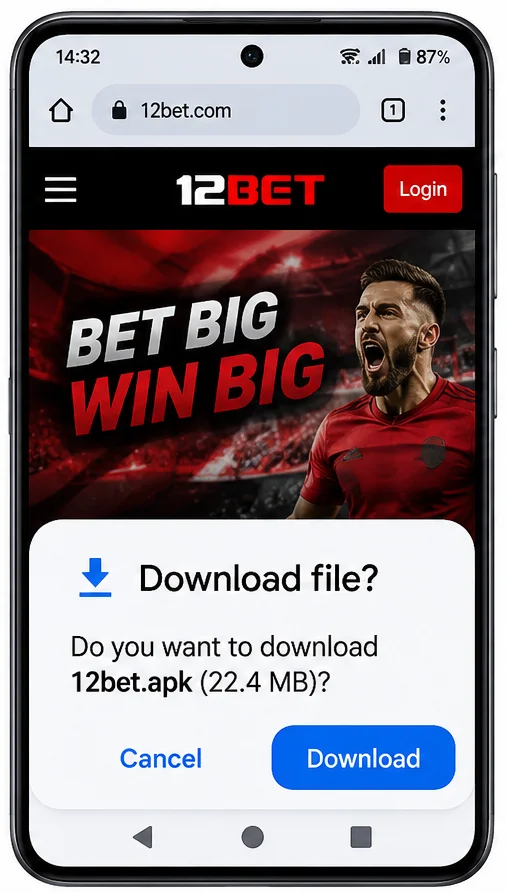
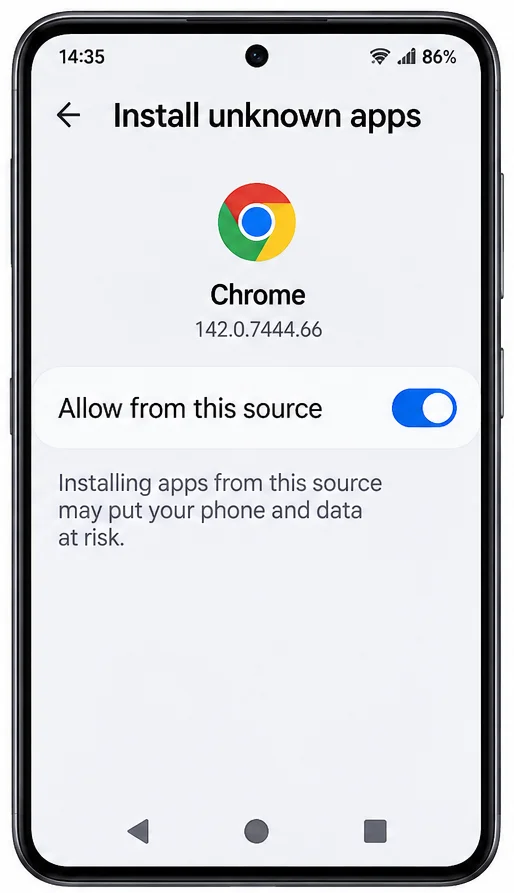
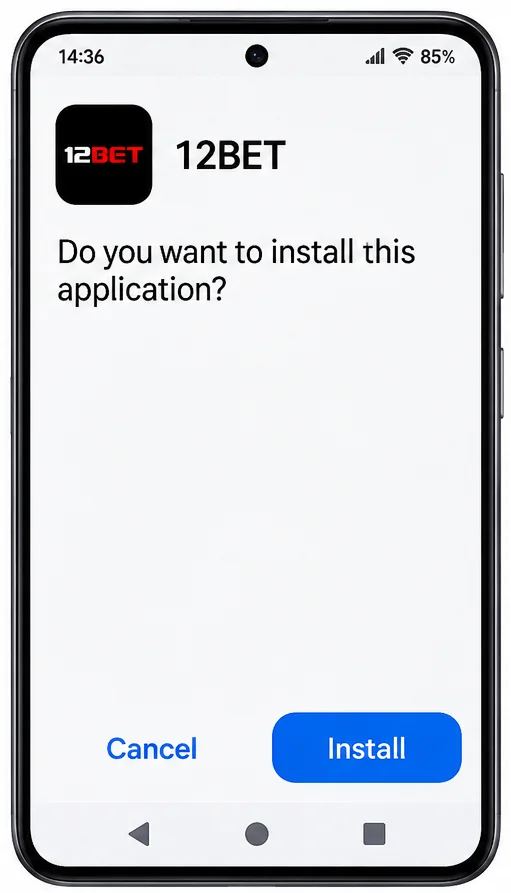
Where to find the "install unknown apps" setting
Since Android 8, this permission is set per app rather than for the whole phone. Menu names differ by brand and Android version; these are the usual paths:
| Stock Android / Google Pixel | Settings › Apps › Special app access › Install unknown apps › Chrome › Allow from this source |
|---|---|
| Samsung (One UI) | Settings › Apps › ⋮ menu › Special access › Install unknown apps › Chrome |
| Xiaomi / Redmi / POCO | Settings › Privacy protection (or Additional settings › Privacy) › Special permissions › Install unknown apps |
| Android 7 and older | Settings › Security › Unknown sources |
If you downloaded with a different browser or a file manager, choose that app instead of Chrome. You can switch the permission off again after installing.
Permissions the 12BET app requests
| Permission | Why it's needed |
|---|---|
| Internet, network and Wi-Fi state | Connects to 12BET and checks whether you are online. |
| Notifications (plus vibrate, exact alarms, full-screen alerts, foreground service, wake lock, start at boot) | Push notifications through Firebase Cloud Messaging, and scheduled notifications that survive a phone restart. On Android 13 and newer you are asked before notifications are shown. |
| Camera, photos and storage | Lets you take or choose a photo inside the app (the app includes an image picker). Android asks you first, and you can refuse. |
| Fingerprint and biometrics | Lets the app use your phone's fingerprint or face unlock if you switch it on. |
| Advertising ID and install referrer | Used by Google Analytics for Firebase to measure installs and app use. You can reset or delete your advertising ID in your phone's Google ad settings. |
| App icon badges (Samsung, Huawei, OPPO, Sony, HTC and other launchers) | Shows the number of unread notifications on the app icon. |
| Notification policy | Lets notifications respect your Do Not Disturb settings. |
Updating the 12BET APK
Apps installed from an APK don't update through Google Play. The 12BET app updates automatically when a new version is released.
If an automatic update fails, download the latest official APK and install it over the existing app. Android keeps your app data, and your 12BET balance and bets are stored on 12BET's servers, not on the phone. Don't uninstall first unless the update fails with a "package conflicts" error.
Something not working?
"App not installed", "There was a problem parsing the package" and blocked installs each have a specific cause. See the Android error table. Once installed, log in with your 12BET account.